


Of course, A4 size is equal to 8.27 inches wide and 11.69 inches tall. A4 paper is 21cm × 29.7 in centimeters. This is one of the most common paper sizes for school, office documents, letters, reports and printed forms.
Did you print a school project and noticed half the letters were missing, close to the edge? Or did what you saw in the document differ from printed paper than you thought of on your PC? It could be due to the paper size.
In this handy guide, we’ll show you the exact measurements of A4 paper, compare A4 paper to US Letter paper, and how to choose your printing settings. Let’s make paper sizing easy!
What Is the A4 Paper Size?
A4 is a commonly used paper size in many countries around the world. It is generally available in schools, offices, homes and printing shops.
A4 is one of the international standard sizes within the A-series system of paper. This system consists of A0, A1, A2, A3, A4 and A5 sizes.
Main facts related to A4 paper:
- Width: 210 mm or 8.27 inches
- Height : 297 mm / 11.69 inches
- Dimension: 21 × 29.7 cm [A4]
- Dimensions: 210 × 297 mm.
- Usage: Schoolwork, letters, reports and forms
Picture a standard school sheet or a written homework page. Most likely, it uses A4 paper.
A4 Paper Size in Inches and in other Units
You may see paper sizes written in inches, centimeters, or millimeters. These are different ways to measure the same thing.
Here is a quick conversion table:
| Measurement unit | A4 paper size |
| Inches | 8.27 × 11.69 inches |
| Centimeters | 21 × 29.7 cm |
| Millimeters | 210 × 297 mm |
| Meters | 0.21 × 0.297 m |
The first number is the width, and the second number is the height when the paper stands upright.
How Do You Convert A4 From Millimeters to Inches?
To convert mm to inch: 1 rule
1 inch = 25.4 millimeters
Get the inches by dividing 210/25.4
To obtain the inch measurement, simply divide by 25.4, meaning: 210 ÷ 25.4 = just under 8.27-inches
To get this in inches, divide 297 by 25.4.
297 divided by 25.4 about eleven and two-thirds of an inch’s
This is how the standard A4 Paper Size comes to be that is 8.27 × 11.69 in or equivalent in mm: – (210mm×297mm)
Portrait and Landscape A4 Paper
A4 paper can be used in two directions: portrait and landscape.
Portrait: The paper is standing up. It is taller than it is wide. We use this shape for school homework, letters, and essays.
Landscape: The paper is lying sideways. It is wider than it is tall. We use this shape for charts, tables, and wide pictures.
The size of the paper does not change when it is tilted. Only the width and height switch places.
| Position | Width | Height |
| Portrait | 8.27 inches | 11.69 inches |
| Landscape | 11.69 inches | 8.27 inches |
For example, when we write essays in school it usually looks good in portrait mode. A wide timetable or chart may be easier to read in landscape mode.
A4 Paper vs. US Letter: What Is the Difference?
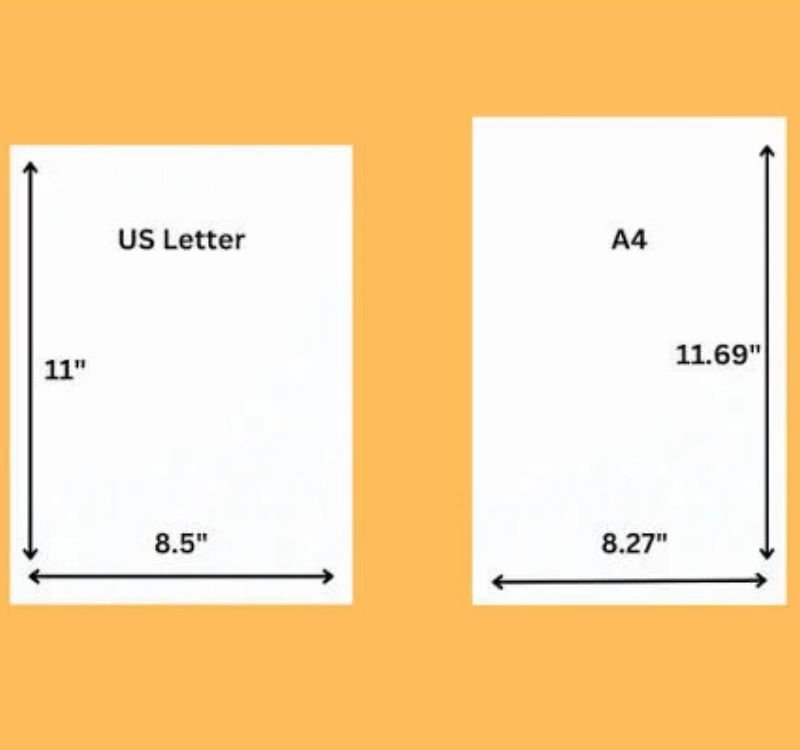
A4 paper and US Letter paper look similar, but they are not the same size.
A4 is common in many countries outside North America. US Letter is widely used in the United States and Canada.
Here is a simple comparison:
| Feature | A4 paper | US Letter paper |
| Width | 8.27 inches | 8.5 inches |
| Height | 11.69 inches | 11 inches |
| Width in cm | 21 cm | 21.59 cm |
| Height in cm | 29.7 cm | 27.94 cm |
In the US, letterpaper is a little wider, but A4 paper is a little taller.
Why Does This Difference Matter?
Say you had a school report and created it on your computer so that it was a US Letter paper. Afterwards, you put it out in the A4 size.
These terms may change on various lines. A table can be wider than the page area. As a result, some content will move on to the next page.
That same problem arises when you make a document training A4 and print it out on US Letter paper.
Easy tip: Whenever possible choose the same size paper in your document and printer settings
Read More : How Big Is 5 CM || 59 Inches || How Tall Is 42 InchesWhere Is A4 Paper Used?
With A4 paper, most of the everyday work is done. Here are some common examples.
School Projects
And students use A4 sheets to write homework, essays, worksheets and do science projects. Being of ample size, it provides enough space for words, pictures and diagrams.
Office Documents
The aforementioned works in places of work consist of A4 paper content for letters, reviews, assembly notes and print records.
Forms and Applications
Most forms and application documents are on A4 paper. Selecting the correct size helps in Namua information inside the place.
Resumes and CVs
In many countries, the A4 print format is the standard used for printing resumes. Setting the page properly ensures that the resume is neat and professional.
Posters and Drawings
A4 paper can also be used for small posters, sketches, charts and basic art.
How to Print an A4 Document Correctly
In fact, a document that appears ideal on a PC should print out without any words or extra whitespace. The best part is that some very basic checks can help.
Follow the steps before printing any paper:
- Select A4 paper. Open the document settings and choose A4 as a page size.
- Check the margins.Avoid placing important text and images around the edges.
- Open Print Preview. This gives you an idea of how the page will look when printed.
- Check the printer settings. If you have A4 paper loaded then make sure the printer settings are on A4.
- Print one test page. Check one page before printing the whole file in case of an important document.
Why Do Printers Leave White Borders?
Most printers cannot print right to the edge of paper. They leave a tiny gap between them and the edge of the page.
This will not be uncommon for home and office printers.
If you need an image to fill a whole page, find out if your printer can print borderless. As printing on A4 paper is not a feature remaining available with all the printers.
When you are doing just regular schoolwork and office documents, a little bit of margin is typically the easiest route.
A4 Paper Size in PDFs and Word Documents
PDF describes how each page will be sized. By using the wrong paper size in the original document, however, it is possible for the page dimensions in the PDF to also differ.
For example, you created a file while a US Letter for that document was selected and saved it as PDF, saving does not mean now it will be A4.
Before printing or sharing a PDF, please confirm the following.
- Is the page size set to A4?
- Are all the words visible?
- Are tables and pictures stuck inside your page?
- Are the pagination of pages okay?
- Does the print preview look correct?
If you are using Ms Word, Select A4 in Page Setup and save it as a PDF; This can help us with preventing layout issues.
But be careful when changing the paper size, since that may shift words or pictures. Always proof your final document prior to printing.
Simple Tips to Remember A4 Paper Dimensions
Here are some simple ways to be able to remember the A4 paper size:
- 8.27 inches is the width.
- 11.69 inches is the height.
- 21 cm is the width.
- 29.7 cm is the height.
- Portrait is the height, landscape is in breadth.
You may also want to remember that A4 is roughly 8.3 × 11.7 inches if you just need a ballpark figure. Use the standard sizes instead of rounded numbers for precise document settings.
Conclusion
A4 paper is recognized as one of the most used paper sizes for school, home and office papers. The regular size of it is 8.27 × 11.69 inches, or 210 × 297 mm
Remember these three simple points:
A4 portrait paper is taller than it is wide
The US Letter is wider than A4 but shorter.
Having your document settings, matching with the printer is a good way to avoid problems while printing.
Understanding these simple measurements makes it much easier to choose the page size that suits your needs. The right A4 settings can make your printed pages – whether it’s homework, a resume or a Pdf.
Frequently Asked Questions
1. What is the exact A4 paper size in inches?
A4 paper measures approximately 8.27 inches wide × 11.69 inches tall. Its official metric dimensions are 210 × 297 mm.
2. Is A4 paper the same as normal printer paper?
In many countries, A4 is the standard paper used in home and office printers. However, some countries commonly use US Letter paper, which has different dimensions.
3. Is A4 bigger than US Letter paper?
A4 is taller than US Letter paper but slightly narrower. A4 measures 8.27 × 11.69 inches, while US Letter measures 8.5 × 11 inches.
4. What is A4 paper size in centimeters?
A4 paper measures 21 cm wide and 29.7 cm tall in portrait orientation.
5. What is A4 paper size in millimeters?
The dimensions are 210 mm × 297 mm.
6. Can I print an A4 PDF on US Letter paper?
Yes, in many cases. However, the printer may shrink or adjust the page, which can change the layout or leave extra white space. Check the print preview first.
7. How do I change a Word document to A4?
Open the page layout or layout settings in Word, select Size, and choose A4. The exact menu names may differ by version. Check the document after changing the size because some content may move.
8. Why is my A4 document printing with cut-off text?
The document may have incorrect paper settings, margins that are too small, or content outside the printer’s printable area. Check the page size and print preview before printing again.


Leave a Reply